5 Tips for a freelancer to make a good relation with your Client


business Relation, Buyer and Freelancer , Freelancer , Money making tips
Buyer is the god of a Business. A successful Business is depend on buyer. No buyer no business and no money. So when a buyer say anything on you, you need to always support her. If you are an writer, Web designer, Logo designer or something like this then this subject aren’t so easy. You written a article or design anything by your own creativity but client need more different or its not seems like which he want. Such this kind of situation you can comply with some certain rules.


#1► Follow international rules 

International rules are not space and time, all conditions are equally recognized. When you work on internet as a Freelancer you comply with the rules. Here are some common rules. You may not learn all rules in one day. Its need some time. Join freelancer.com or odesk.com, Apply for a job or read the description on the job. Example, you want to a job may be logo design. So on the logo design job, client give some description to how you design his logo Ex: Style(Text, Text+image, logo), Color(What color is specified, what color will not), where it will use(web page, ad banner, or other place) etc. After get a job, make a list that what is need to know about this job before start working and find out it from your client.


#2► Understand the client's attitude 

Always try to find out client’s attitude. Most of the client’s first say you that, “he do not understand about this work, do it yourself”. After you completed his work he start to find bug on your work and you work continue to make changes.


#3► Keep the time specified 

Before beginning a work first select a time when you can completed this job, complete your work on this time. Do not extend your time for client’s request (without any special matter) . As a freelancer if you delay extra one day on your own work remember this you will damage your tomorrow work by yourself. So do not extend your time.


 #4► Show samples of work before fully complete your job

Always some difference between you and client. Before submit your final project first give a sample of your work and see what is her opinion. If you need, change it. Many people follow some special rules about this, ex: when submit a sample of your work, give it with some error which your client can easily see.

#5► Do not give any discount on payment time


The most troublesome part on freelancer is get money. You have done your work, now client give your money perfectly do not thought about this. If you thought you may be loss. Do not work without money and not remaining any money. Some of the client’s said that when payment time is come: Now problem, give your money two days later, two hour later etc. Do not trust him anymore.


As a Freelancer there are no alternative without experience. You may not success on your freelancer life quickly. But bit by bit your experience will increase, with increasing experience you find success on your Freelancing career.

[Read More...]


Upgrade your blogger comment Box to wordpress comment box style


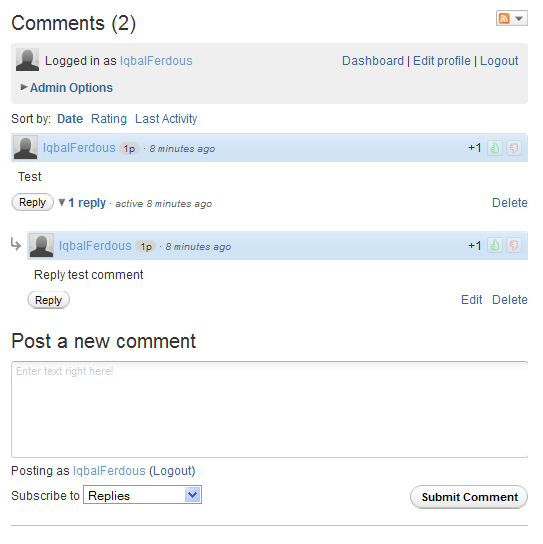
Change your blogger comment box by adding a awesome wordpress style comment box. Hope you know what is Wordpress? Wordpress is a famous free open source Cms Script for buildup a website. The comment system of wordpress blog is so nice, very easy. So why we are blogger user do not use this awesome comment box in our website? Our today tutorial is about adding this wordpress style comment box on blogger.
comment  

Demo, demo button, see demo, live demo


Customize Your Blogger comment box like wordpress:


First go Here Intensedebate

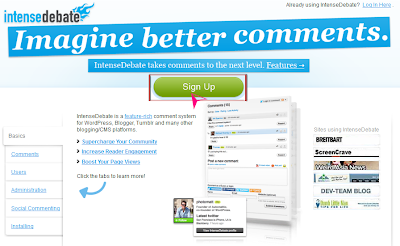
Click on the signup button.

intensedebate

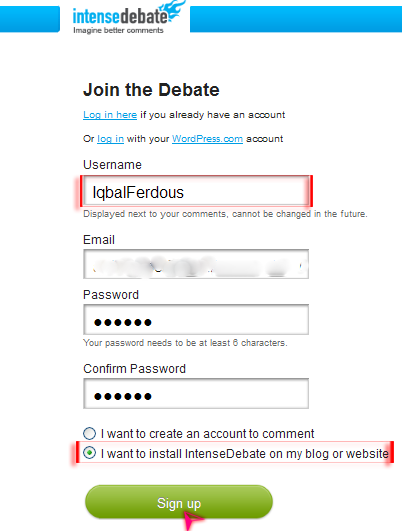
Now write your user name (The user name use to comment on your blog, you do not change it later), enter your email and password. Before click on sign up, select what you want to do by create this account. We want to install comment box in our site so check on the second step which is – I want to install intense Debate on my blog or website.

login form

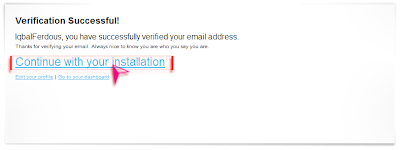
A confirmation email will send on your email account. Verify your mail address. After verify your mail address you see a page look like on the bottom image. Now click on Continue with installation link.

verify email

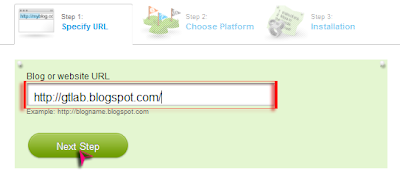
Give your blog url and go to next step.


input url

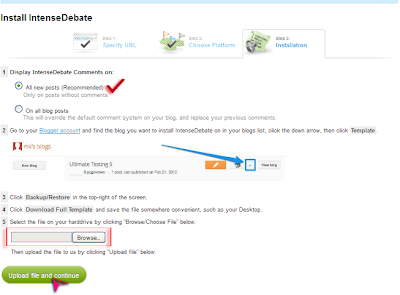
You will see a page on the next step look like below image. Now you need to upload your full blogger template on there.
 
web page

Go to your Blogger Dashboard>Template>Backup or Restore and Download your full template on your pc. Now on this page you need to upload your just downloaded website Template. No need to change anything on this page. Just upload your template and click continue.


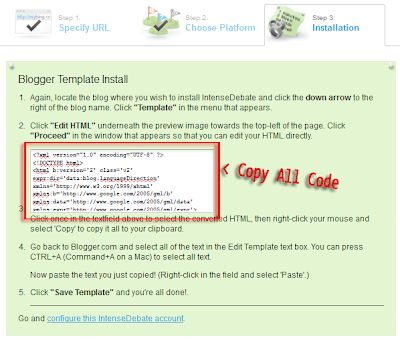
After finish upload template, they edit your template automatically and add the comment box on your template. You now just need to copy all these Selected (Press Ctlr+A) code.

copy html code

Go to your Blogger Dashboard> Template> Edit Html> Proceed. Select all the code of html box (Press Ctlr+A) and paste the copied code above the selected code. Save your Template. Your all done :)


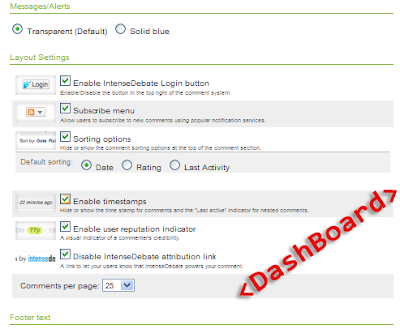
To change your comment box style, setting, add or remove many options just go to your Intense debate account Dashboard.

account dashboard


To remove this comment box from your blog after installing, Just upload your previous downloaded template.

 
Let me know how you enjoying this awesome Comment box.

[Read More...]


Simple Tricks to Push Up Google Page Rank on your site


google pagerank, push up google pr, optimize google pagerank
Growth your site google page rank by following these tips. Now a days pagerank not doing any important role for your site SERP result. But its necessary to indicates the importance of your web page. Here I giving you some tips from my experience to optimize your site google page rank.


Onpage Seo: 

Check your site onpage seo is fully completed. Make your site search engine friendly. Create your site Meta Description, Meta Keyword, Submit your website sitemap on google Webmaster Tools. Add at last two Internal Link on your every article of blog post. Internal Link Building is also helpful to Push down your website Bounce rate. Use Nofollow alt on other external link. Make your site also user friendly. On your blog add recent post widget, popular post widget, Category etc. For this reason your site visitor can easily access your site and page rank algorithm also give a benefit of your site.


Write Unique Article: 

This is a very important things now a days. You need to write unique article and update your blog regularly. Unique article is the one of the best way to get a high Page Rank without doing hardworking seo . Also always avoid copy paste post. Try hard to write yourself. Many example on the web that they got google page rank without any high quality backlink or doing other seo method. Do you know why? This is only for his article. Because article is always king for a site.

Social Share: 

After post your article on your blog, share it on social networking site facebook, Google plus, twitter etc. This will give you some traffic and also crawler can quickly index your post.


Link Building: 

At last we are now talking about link building. Always try to build your link on relevant site. One relevant back link is more helpful than five irrelevant backlink. irrelevant backlink is also needed, but not too many!
Also try to build your site link on high pr dofollow website.When doing link building work on anywhere, do not start spamming on there. Always try to build your link naturally.


Say me your experience about pushing any site Page Rank. 

[Read More...]


Make your own java Application (.Jar/.Jad) Without any programming knowledge.


java programing, create java software

How to make a java software? How to create a .jar application? How can I make java application for my java mobile without any any experience in J2ME programming?

All these question answer you can find on this post. Here is a one website for you to create you java software easily.


[Read More...]


Design your website by using Adobe Dreamweaver


Adobe Dreamweaver tutorial, make website, create website, web design,
Adobe Dreamweaver is a popular software for design a webpage. You can use both design view and code view on this software. The people who know HTML, ColdFusion, ASP.Net, they are also use Adobe Dreamweaver, because its some great feature. If you need a JavaScript code, but you do not know about making JavaScript code you can easily make this by Dreamweaver Behavior. Look like this you can also use image rollover effect by this software.


[Read More...]


Recent Post

Followers

Return to top of page Copyright © 2012- Gaiety Tech | Powered By Blogger